Case 01 / 個人プロジェクトPersonal project個人專案

Babos

「この案件がいま頭をどれだけ占めているか」を泡で見せる、作業記録アプリA work log app that shows, with bubbles, how much of your head each project is taking up一個用泡泡顯示每個案子佔掉你多少腦袋的工作紀錄 app

PDFをダウンロードDownload PDF下載 PDF
期間When時間2026年8月〜10月Aug - Oct 20262026 年 8 月到 10 月
対応環境Platforms平台macOS、Windows、iPhonemacOS, Windows, iPhonemacOS、Windows、iPhone
言語Languages語言日本語・中国語・英語Japanese, Chinese, English日文、中文、英文

01背景と目標Background and goal背景與目標

背景Background背景

フリーランスの案件には、はっきりした日付の区切りがないことが多い。私はメモだけで案件を管理していて、仕事で使った管理ツールは技術寄りで、直感的ではなかった。Freelance projects often lack clear date milestones. I only kept notes, and the tools I had used at work were technical and unintuitive.接案的案子常常沒有明確的日期節點。我只用筆記在管,而以前在公司用過的工具偏技術、不直覺。

課題感Problem問題

こうしたツールは「日付」で区切る。実際に一番時間がかかるのは、クライアントとやり取りして修正を重ねる中盤だ。大きな方向が決まれば残りは派生して進むので、終盤はむしろ一番楽になる。Those tools split work by date. The costliest part is the middle, going back and forth with the client. Once the direction is agreed, the rest follows and the end is the lightest.那些工具是用日期來切工作。最花力氣的是中段,跟客戶來來回回改。方向一旦談定,剩下的就順著走,收尾反而最輕鬆。

目標Goal目標

直感的で、相対的で、気軽。持ち歩くメモのような進捗記録表。Intuitive, relative and relaxed: a progress log that feels like a pocket notebook.直覺、相對、輕鬆:一本像口袋筆記本的進度紀錄。

02開発の流れProcess流程

  1. 1
    ルールを定義Define the rules定義規則
    8月Aug8 月
    大きさと濃さの意味What size and shade mean大小與深淺代表什麼
    Claude Design
  2. 2
    HTML試作版HTML prototypeHTML 試作版
    8/21 v0.3.121 Aug, v0.3.18 月 21 日,v0.3.1
    Mac, Windows
    TauriGitHub Actions
  3. 3
    ネイティブMac版Native Mac app原生 Mac app
    v0.2.4
    同じ機能を書き直しSame features, rewritten同樣的功能,重寫
    SwiftUIClaude Code
  4. 4
    iPhone版iPhone appiPhone app
    9/11からFrom 11 Sep9 月 11 日起
    同じコードを共有Shared codebase共用同一套程式碼
    画面とロジックの自動テストAutomated tests for screens and logic畫面和算式的自動測試
  5. 5
    審査提出Submission送審
    9/2828 Sep9 月 28 日
    動画を撮り足し、審査に返信Added a video, answered review補錄影片,回覆審查
    App Store Connect
  6. 6
    承認Approved通過
    10/22 Oct10 月 2 日
    iPhone 1.0
    Netlify公式サイトNetlify siteNetlify 網站

03デザインルールDesign rule設計規則

取捨選択Trade-offs取捨試して、削ったものTried, then cut試過,然後砍掉

✕進捗リングProgress ring進度環
✕透明度を下げていくFading opacity逐漸變淡的透明度
✕重要度で大きさを決めるImportance sets size用重要度決定大小
✓大きさ=頭の占有度
濃さ=どこまで進んだか
Size = mental load
Shade = progress so far
大小=佔腦程度
深淺=目前進度

04構成Architecture架構

データはどこにあり、画面はどう受け取り、Mac と iPhone はどう分かれているかWhere the data lives, how the screens get it, and how Mac and iPhone are split資料放在哪、畫面怎麼拿到、Mac 和 iPhone 怎麼分

図は横にスクロールできます。Scroll the diagram sideways.圖可以左右捲動。

Mac Mac Mac SwiftUI、macOS 14以上 SwiftUI, macOS 14 and up SwiftUI,macOS 14 以上 泡の画面、右の詳細、下の一覧 Bubbles, detail on the right, listbelow 泡泡、右側詳情、下方清單 Mac 専用のファイルは5つ Five Mac-only files Mac 專用檔案五個 終了時に書き切る Flushes the file on quit 結束時寫完檔案 iPhone iPhone iPhone 同じコードを共有 Shared codebase 共用同一套程式碼 泡の画面、一覧は下から引き出す Bubbles, list pulled up from below 泡泡,清單從下方拉出 手機画面は iOS/ に別置き Phone screens live in iOS/ 手機畫面放在 iOS/ 背景に入ると書く Writes when sent to the background 進背景時寫入 共有:泡の物理 Shared: bubble physics 共用:泡泡物理 TimelineView(.animation) で駆動 Driven by TimelineView(.animation) 由 TimelineView(.animation) 驅動 大きさと濃さの式は Model に Size and shade formulas live in Model 大小與深淺的公式在 Model Store Store Store @MainActor @Observable、1つだけ @MainActor @Observable, one instance @MainActor @Observable,只有一個 画面には引数で渡す Passed down to screens as a parameter 用參數傳給各畫面 案件、記録、リンク、タグ、設定を持つ Holds cases, logs, links, tags andsettings 持有案件、紀錄、連結、標籤、設定 20件で1巡、報告を書き出す Every 20 cases, one cycle and a report 每 20 件一巡,輸出報告 保存の決まり Saving rules 存檔規則 変更の400ミリ秒後に書く Writes 400 ms after a change 改動後 400 毫秒寫入 読めなかったら書かない(保存をブロック) No write after a failed read (savingblocked) 讀取失敗就不寫(擋住存檔) 保存の状態は設定画面に出す Save status shown in Settings 設定頁顯示儲存狀態 項目を足すときは古いファイルも読めるように New fields keep old files readable 加欄位時舊檔也要讀得進來 data.json data.json data.json Codable の JSON、1ファイル One Codable JSON file 一個 Codable JSON 檔 案件、タグ、言語、配色、周期 Cases, tags, language, theme,cycle 案件、標籤、語言、配色、週期 Application Support の中 Under Application Support 在 Application Support 裡 UserDefaults も iCloud も使わない No UserDefaults, no iCloud 不用 UserDefaults,也不用 iCloud backups/ backups/ backups/ 毎日1つ、7日分 One a day, keep seven 每天一份,留七份 data-yyyy-MM-dd.json data-yyyy-MM-dd.json data-yyyy-MM-dd.json 読み込みに成功した後だけ Only after a successful read 只在讀取成功後 Mac と iPhone は同期しない Mac and iPhone do not sync Mac 與 iPhone 不同步 端末ごとに別のファイル A separate file on each device 每台裝置各自一個檔案 App Store App Store App Store iPhone 1.0、Mac 1.0 とも公開済み iPhone 1.0 and Mac 1.0 both live iPhone 1.0、Mac 1.0 都已上線 GitHub Releases GitHub Releases GitHub Releases GitHub 版だけ更新を確認する Update check, GitHub build only 只有 GitHub 版會檢查更新 唯一の通信、配布は手で The only network call; releasespacked by hand 唯一的連線,手動打包發佈 報告の出口 Report output 報告的出口 Mac:保存ダイアログで .md Mac: save panel, a .md file Mac:存檔視窗,.md 檔 iPhone:共有シート iPhone: share sheet iPhone:分享面板 リンクを開く Opening links 開連結 ブラウザ、Figma、Drive Browser, Figma, Drive 瀏覽器、Figma、Drive App Store 版は本機のファイルを開けない The App Store build cannot openlocal files App Store 版不能開本機檔案 1 2 3 4 5 画面 SCREENS 畫面 アプリの中身 APP CORE 應用層 この端末に保存 ON THIS DEVICE 存在這台裝置 外部 OUTSIDE 外部 3つのビルド、コードは共通 THREE BUILDS, ONE SHARED CODEBASE 三個建置,共用一套程式碼 GitHub 版 Mac GitHub Mac build GitHub 版 Mac build.sh、自己署名 build.sh, ad-hoc signed build.sh,自行簽署 更新の確認あり、サンドボックスなし Update check on, no sandbox 有檢查更新,沒有沙盒 Mac App Store 版 Mac App Store build Mac App Store 版 サンドボックス、APPSTORE フラグ Sandboxed, APPSTORE flag 沙盒,APPSTORE 旗標 更新の確認なし、旧データを読み込むボタン No update check; a button imports olddata 不檢查更新,有讀入舊版資料的按鈕 iPhone と同じ商品ページ Same listing as the iPhone app 和 iPhone 同一個商店頁 iPhone 版 iPhone build iPhone 版 iOS 17以上、縦向きのみ iOS 17 and up, portrait only iOS 17 以上,只有直式 画面とロジックの自動テスト Automated tests for screens and logic 畫面和算式的自動測試 HTML 版(Mac、Windows) HTML version (Mac, Windows) HTML 版(Mac、Windows) 別のコード、別のデータ Separate code, separate data 另一套程式碼,另一份資料 Tauri で配布、新しい案を先に試す場 Packaged with Tauri; where new ideasare tried first 用 Tauri 打包,新點子先在這裡試 1 起動時に data.json を読む。読めなければ保存をブロックして知らせる On launch, read data.json; if that fails, block saving and say so 啟動時讀 data.json,讀不了就擋住存檔並提示 2 読めたら、その日の分のバックアップを1つ残す After a good read, keep one backup for the day 讀成功就留當天一份備份 3 Store が案件を持ち、画面は Store から描き、編集は Store に戻す Store holds the cases; screens draw from it and send edits back Store 持有案件,畫面從它畫,編輯再送回去 4 変更は400ミリ秒後に data.json へ書く Changes reach data.json 400 ms later 改動 400 毫秒後寫進 data.json 5 20件で報告を書き出す。Mac は保存ダイアログ、iPhone は共有シート At 20 cases, export a report: save panel on Mac, share sheet on iPhone 滿 20 件輸出報告:Mac 用存檔視窗,iPhone 用分享面板 私が確認済み Confirmed by me 我確認過的 コードと記録からの推定、まだ確認していない Inferred from the code and my notes, not yet confirmed 從程式碼和紀錄推的,還沒確認

破線の箱はコードと記録から私が推定したもので、まだ確認していない:data.json の場所と「Mac と iPhone は同期しない」【確認】、GitHub 版だけが更新を確認すること【確認】、報告の出口(保存ダイアログと共有シート)とリンクの扱い【確認】、GitHub 版と Mac App Store 版の違い、商品ページが共通であること【確認】、HTML 版との関係【確認】。実線の箱は、このページの他の節で書いたことか、コードで確かめたこと。The dashed boxes are my inference from the code and my notes, not yet confirmed: where data.json lives and that Mac and iPhone do not sync [check], the update check being in the GitHub build only [check], the report output (save panel, share sheet) and how links open [check], the differences between the GitHub and Mac App Store builds, and the shared listing [check], the relation to the HTML version [check]. Solid boxes are what the other sections of this page already say, or what I checked in the code.虛線的框是從程式碼和紀錄推出來的,我還沒確認:data.json 的位置,以及「Mac 與 iPhone 不同步」【確認】、只有 GitHub 版會檢查更新【確認】、報告的出口(存檔視窗、分享面板)和連結怎麼開【確認】、GitHub 版和 Mac App Store 版的差別,以及共用同一個商店頁【確認】、和 HTML 版的關係【確認】。實線的框是這一頁其他段落已經寫過的,或是我在程式碼裡查過的。

05画面Screens畫面

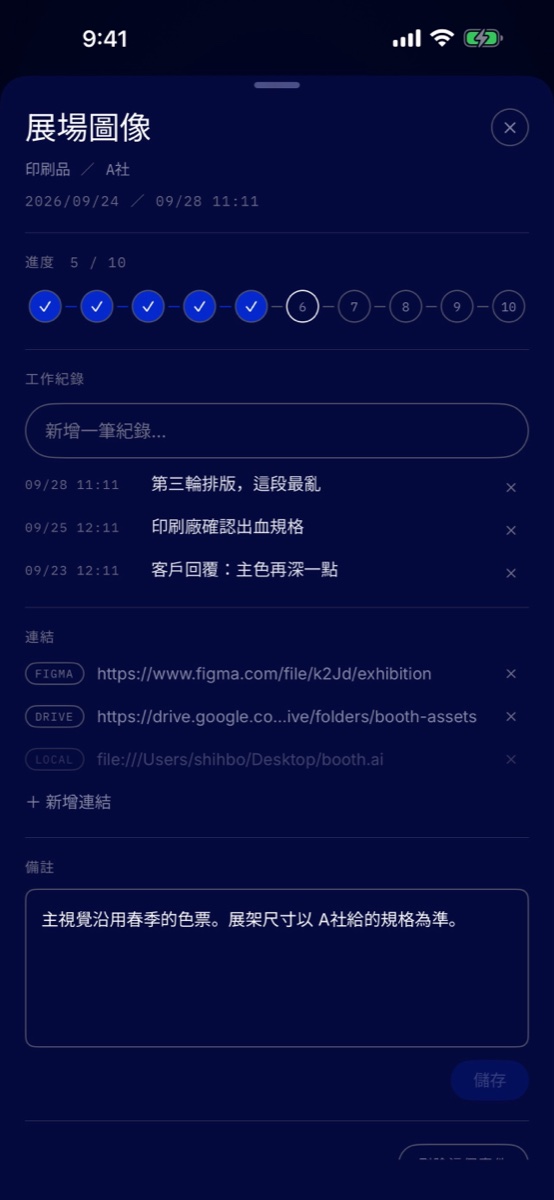
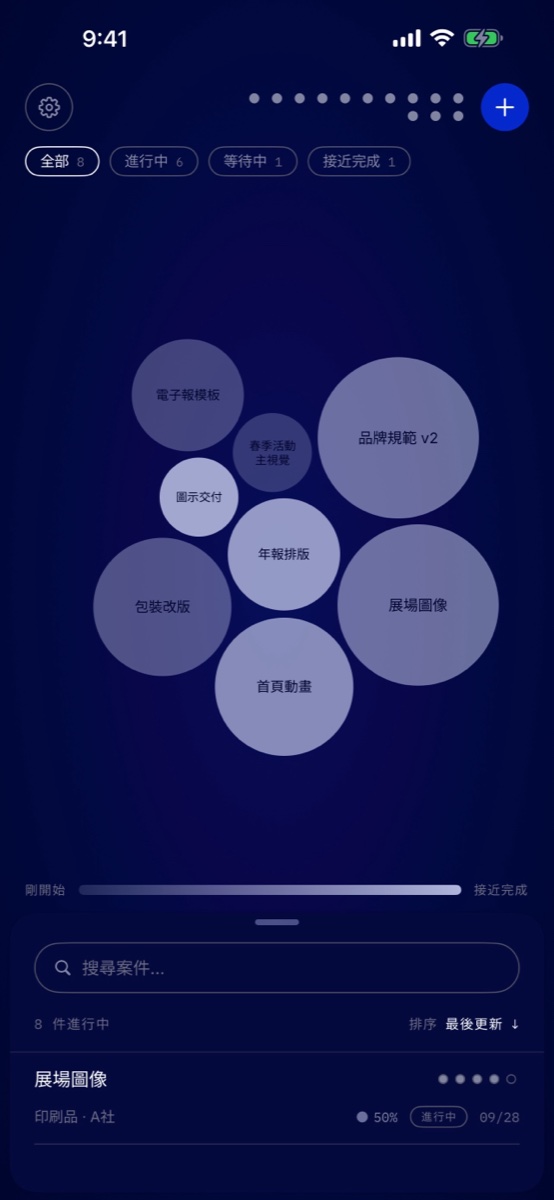
画面はすべてサンプルデータで、私の実際の案件は含まれていません。Every screen shows sample data; none of my real projects appear.每個畫面都是範例資料,沒有任何我真實的案子。
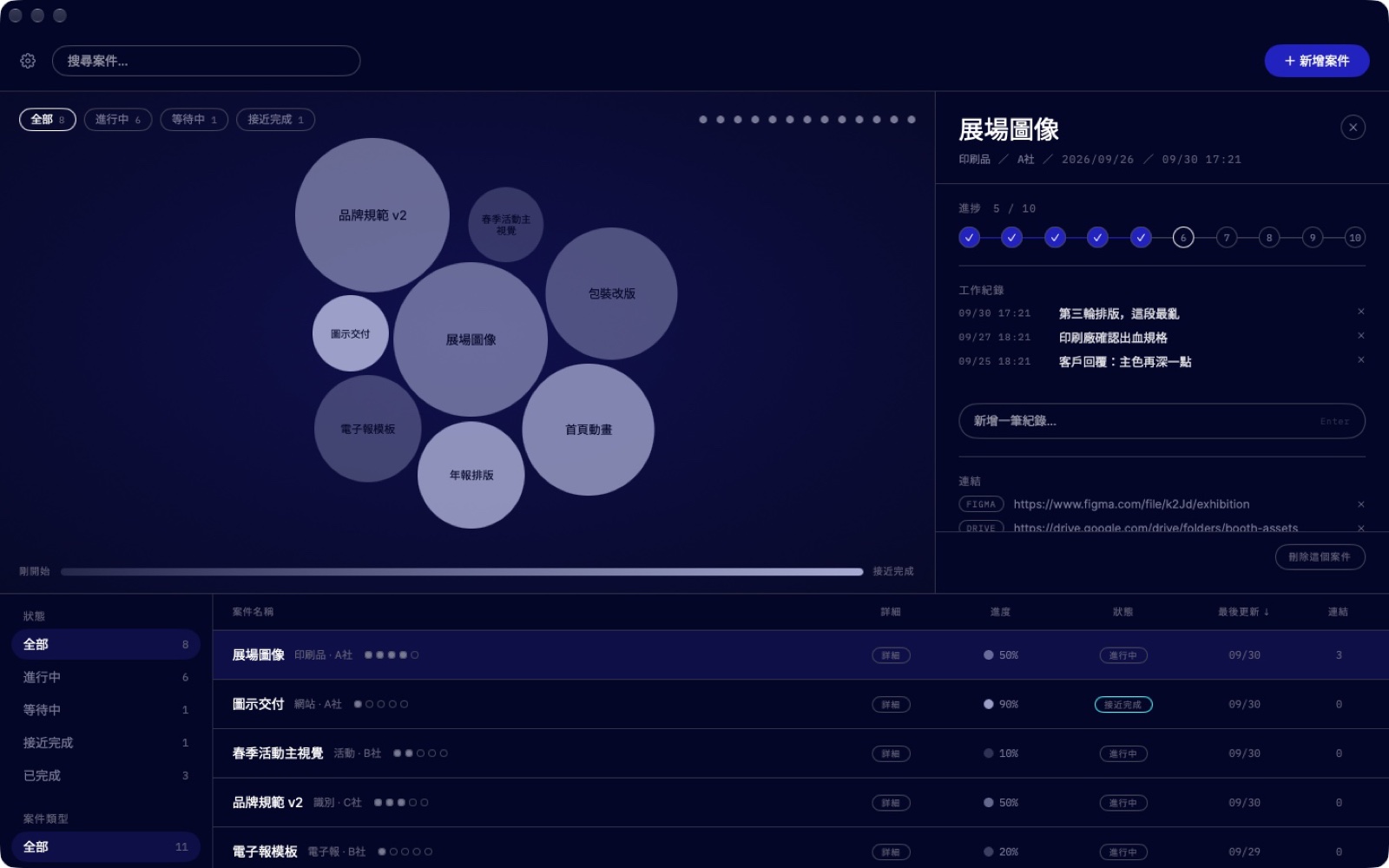
Babos on Mac: the bubble view, the detail panel on the right and the project list below, all sample data
Mac版、全体の画面。泡の大きさが頭の占有度、濃さが進捗。泡、右の詳細、下の一覧という三分割は私の設計。Mac, the main screen. Bubble size is mental load and shade is progress. The three-part layout, bubbles, detail on the right and the list below, is my design.Mac,主畫面。泡泡的大小是佔腦程度,深淺是進度。泡泡、右側詳情、下方清單這個三分的版面是我的設計。
Babos on iPhone: the bubble view with the project list pulled up from the bottom, sample data
iPhone版、泡の画面。同じルールを縦画面に移し、一覧は下から引き出す形にした。iPhone, the bubble view. The same rule on a portrait screen; the list is pulled up from the bottom.iPhone,泡泡畫面。同一套規則搬到直式畫面,清單改成從下方拉出來。
Babos on iPhone: a project's detail sheet with ten progress steps, work notes and links, sample data
iPhone版、案件の詳細。進捗は10段階のチェック、作業記録とリンクを一枚に。日付で区切らないという判断がここに出ている。iPhone, a project's detail. Progress as ten steps, with work notes and links on one sheet. The decision not to split work by date shows here.iPhone,案子的詳情。進度分成十格,工作紀錄和連結放在同一張。不用日期切工作的決定,在這裡看得出來。

06課題と対応Problems and fixes問題與修正

課題PROBLEM問題
私の対応WHAT I DID我的處理
持ち帰った原則PRINCIPLE原則
保存に失敗しても、画面に何も出なかったSaving failed and the screen showed nothing儲存失敗,畫面上什麼都沒顯示
→
設定画面に保存状態を表示し、エラーを握りつぶさないようにしたShow the save status in Settings so errors are no longer swallowed在設定頁顯示儲存狀態,錯誤不再被吞掉
→
エラーを握りつぶすなら、画面に逃げ道を残すIf you must catch an error, leave a way out on screen如果非得接住錯誤,就在畫面上留一條出路
起動時に、古いデータが本体を上書きしたOn launch, old data overwrote the original file啟動時,舊資料覆蓋掉了原本的檔案
→
「ファイルを読み終えるまで書き込まない」ゲートを追加Added a gate: no writing until the file has been read加了一道閘門:檔案讀完之前不寫入
→
まず順序を確認し、機能の話はそのあとCheck the order first, features second先確認順序,功能擺第二
読み込みに失敗したあと、保存すると空のファイルになったAfter a failed read, saving wrote an empty file讀取失敗之後,一儲存就寫出空檔案
→
保存をブロックして警告し、毎日の自動バックアップを7件残すBlock saving and warn; automatic daily backup, keep 7擋住儲存並警告;每天自動備份,保留 7 份
→
まず、データを失わないことData must never be lost資料絕對不能丟
審査で追加資料を求められ、状態が「拒否」と表示されたReview asked for more information and showed "Rejected"審查要求補資料,狀態顯示「已拒絕」
→
操作動画を自分で撮り、項目ごとに返信したRecorded a walkthrough video and answered each item錄了操作影片,逐項回覆
→
審査のルールを先に確認してから提出するSpell out the review rules before submitting送審前先把審查規則弄清楚

07役割分担Working split分工

私の役割MY ROLE我的角色プロダクト定義Product definition產品定義ビジュアルと操作の設計Visual, interaction視覺、互動受け入れAcceptance驗收リリースRelease發佈
01
私Me我要件を定義Define needs定義需求
02
AI実装Build實作
03
AIコードを説明Explain code解釋程式碼
04
私Me我受け入れ・取捨Accept, weigh驗收、取捨
05
AI3方向チェック3-way check三方向檢查
06
私Me我何を直すか決めるChoose fixes決定修什麼
07
私Me我審査への返信Answer review回覆審查

08成果Results成果

3
言語
日・中・英
Languages
JA, ZH, EN
種語言
日、中、英
3
対応環境
Mac、Windows(HTML版)、iPhone
Platforms
Mac, Windows (HTML version), iPhone
個平台
Mac、Windows(HTML 版)、iPhone
4
データ消失リスク
審査提出後に発見、1.0.1で修正
Data-loss risks
found after submission, fixed in 1.0.1
個資料遺失風險
送審後發現,1.0.1 修掉
1.0
iPhone版・Mac版とも
App Storeで公開
iPhone and Mac versions
on the App Store
iPhone 與 Mac 版
都已上架

09Claudeの講評Claude's viewClaude 的看法

共同作業者の見方で、筆者が書いたものではありません。The collaborator's opinion, not written by the author.共同作業者的意見,不是作者寫的。

Claudeの講評Claude's viewClaude 的看法共同作業者の見方Collaborator's opinion共同作業者的意見

良かった点Worked well做得好的地方

  • 大きさと濃さにそれぞれ意味を持たせていて、仕事の実際の観察から来ている。Size and shade each carry one meaning, taken from how client work really goes.大小和深淺各有一個意思,來自接案工作的實際狀況。
  • 却下した案と数式の理由が残っていて、あとの変更に根拠がある。Rejected options and formula rationale recorded.否決的方案和公式的理由都有留下紀錄。

改善できる点Could be better可以更好的地方

  • 今のところ検証したのは筆者本人だけで、他の人も同じ課題を感じているかの根拠はまだない。Validated only by the author so far.目前只有作者本人驗證過。
  • データ消失のリスクは審査提出後に見つかった。保存機能ができた時点でテストを足すべきだった。Data-loss risks found only after submission.資料遺失的風險在送審之後才發現。