Konsiaj
不動産の販売図面(マイソク)をClaude APIで読み取り、スマホで全項目を直して、必要なところだけを画像1枚にして送るiPhoneアプリ。日本で不動産売買の仕事をしている友人のために、週末の2日間で作った。An iPhone app that reads a Japanese property sales sheet (a maisoku) with the Claude API, lets you correct every field on the phone, and sends just what is needed as one image. Built over a weekend for a friend who sells property in Japan.用 Claude API 讀取日本不動產的販售圖面(マイソク),在手機上每一格都能改,再把需要的部分合成一張圖送出的 iPhone app。為了在日本做不動產買賣的朋友,週末兩天做出來的。
PDFをダウンロードDownload PDF下載 PDF01背景と目標Background and goal背景與目標
物件の情報が、いまだにかなり原始的なやり方で回っているListing information still travels in a very primitive way物件資訊到現在還是用很原始的方式在傳
出発点Where it started起點
日本で不動産売買の仕事をしている友人と話していて、物件情報の受け渡しがいまだにかなり原始的だと気づいた。Talking with a friend who works in property sales in Japan, I realised how primitive the way listing information gets passed around still is.跟在日本做不動產買賣的朋友聊天時,發現物件資訊的傳遞方式到現在還是很原始。
問題The problem問題
物件ごとにA4一枚のマイソクがあり、たいていはPDF。それがLINEやWeChatで何人もの営業の間を回る。決まった形式はなく、必要なところはコピーして貼り、写真を何枚か付けるだけ。間違いがあっても、すぐには直せない。Each property has a maisoku, a one-page A4 sales sheet, usually a PDF. It travels between several agents over LINE or WeChat. There is no fixed format: you copy and paste the details you need and attach a few photos. If something is wrong, there is no quick way to fix it.每個物件都有一張 A4 的マイソク,通常是 PDF,透過 LINE 或 WeChat 在好幾個業務之間傳來傳去。沒有固定格式,需要的資訊就複製貼上、再附幾張照片。資料有錯,也沒辦法馬上改。
目標Goal目標
マイソクを読み取って項目に分け、スマホでどの項目も直せて、相手に必要なものだけを画像1枚にして送れること。社内のデータ担当にはCSVで渡せること。Read the sheet into fields, let any field be corrected on the phone, and send only what the other person needs as one image. For colleagues who handle data at the office, export a CSV.把マイソク讀成一格一格的資料,在手機上哪一格都能改,再只把對方需要的部分合成一張圖送出。給公司裡處理資料的同事,就匯出 CSV。
02仕組みと作り方How it works, and how it was built運作方式與開發方式
上の3段がアプリの中の流れ。下の輪は、2日間でアプリを育てたやり方。The top three lanes are what happens inside the app. The loop below is how the app was built over two days.上面三條是 app 裡的流程。下面的循環,是這兩天把 app 做出來的方式。
黒は人がやること(上は使う人、下は私)。灰色はアプリ、中継、Claudeがやること。点線は役を与えたエージェントの確認と、補足。Black is what a person does (the user above, me below). Grey is what the app, the relay and Claude do. Dashed is the role-played review, and notes.黑色是人做的事(上面是使用者,下面是我)。灰色是 app、轉送站和 Claude 做的事。虛線是 Claude 扮演角色的審查,以及補充說明。
03Claude APIの使い方How the Claude API is usedClaude API 的用法
モデルを選ぶ前に、同じ見本で比べたThe models were compared on the same sheets before choosing選模型之前,先用同樣的範例比過
| Claude Sonnet 採用CHOSEN採用 | Claude Haiku | 端末内の文字認識On-device text recognition手機內建文字辨識 | |
|---|---|---|---|
| 正確さAccuracy正確度 | 価格、所在地、交通、面積はすべて正しい。区画が複数あっても分けられるPrice, address, transport and area all correct; several plots split apart價格、地址、交通、面積全對;多個區畫也分得開 | 数字は正しいが、字が抜けたり違ったりする。1枚は多くの項目を落としたNumbers right, but characters dropped or wrong; missed many items on one sheet數字對,但會掉字、錯字;有一張漏了很多項 | 文字はほぼ正しいが、ばらばらの行のまま。項目に分かれないText almost all correct, but as loose lines, not fields文字幾乎都對,但只是散的一行行,沒有分成欄位 |
| 写真と図Photos and plans照片與圖 | 位置を返すので、アプリが自動で切り出せるReturns positions, so the app crops them itself會回傳位置,app 能自動切圖 | (比較は文字のみ)(text compared only)(只比文字) | 切り出せないCannot crop無法切圖 |
| 1枚あたりPer sheet每張 | 約0.02米ドル、平均8.6秒About 0.02 US dollars, 8.6 s on average約 0.02 美元,平均 8.6 秒 | 約0.002米ドル、平均13秒(むしろ遅い)About 0.002 US dollars, 13 s on average (slower)約 0.002 美元,平均 13 秒(反而比較慢) | 無料、Macで約21秒(読み込み込み)Free; about 21 s on a Mac, including loading免費;Mac 上約 21 秒(含載入) |
SonnetとHaikuは公開されている見本6枚、端末内の文字認識は1枚で、自分で試した数字。端末内の小さなAIモデルは、Macで準備ができず試せなかった。Sonnet and Haiku were run on six published sample sheets, on-device recognition on one; the figures come from my own test runs. Apple's on-device model could not be tested, as it was not ready on the Mac.Sonnet 和 Haiku 用了 6 張公開範例,手機內建文字辨識用 1 張,數字都是自己實測的。手機內建的小型 AI 模型,在 Mac 上沒準備好,沒測成。
見本と突き合わせて直したことWhat changed after checking results against the sheets跟原圖對照後改掉的地方
04業界のルールをアプリに入れるTrade rules built into the app把業界規則放進 app
読み取るだけでなく、仕事でそのまま使えるようにNot just reading the sheet, but making it usable for the job不只是讀出來,還要能直接拿去工作
仲介手数料と手付金Brokerage fee and deposit仲介費與手付金
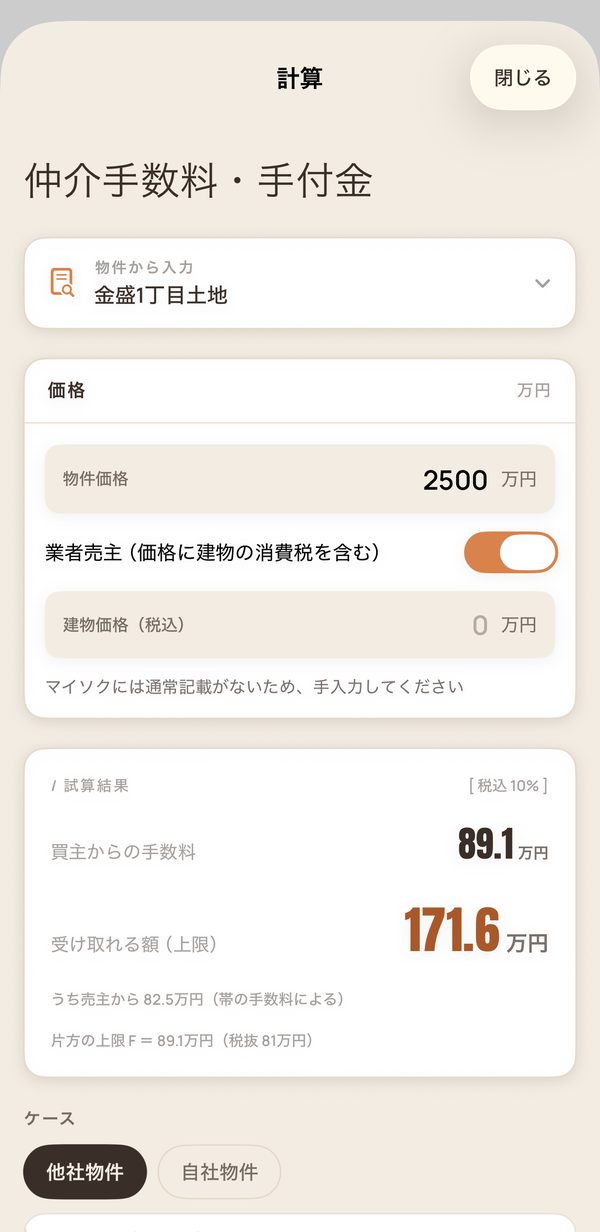
買主が払う額と、営業が受け取れる額の両方を出す。他社の物件か自社の物件かで見方を切り替える。手付金はマイソクに書かれた割合から計算し、価格を直せば計算し直す。Shows both what the buyer pays and what the agent can receive, with a switch between another company's property and your own. The deposit is worked out from the ratio on the sheet, and recalculated when the price is corrected.同時算出買方要付多少、業務能收多少;可以切換「他社物件」和「自社物件」兩種角度。手付金照マイソク上的比例算,價格改了就重算。
お客様向けと業者向けFor clients, for agents給客人、給業者
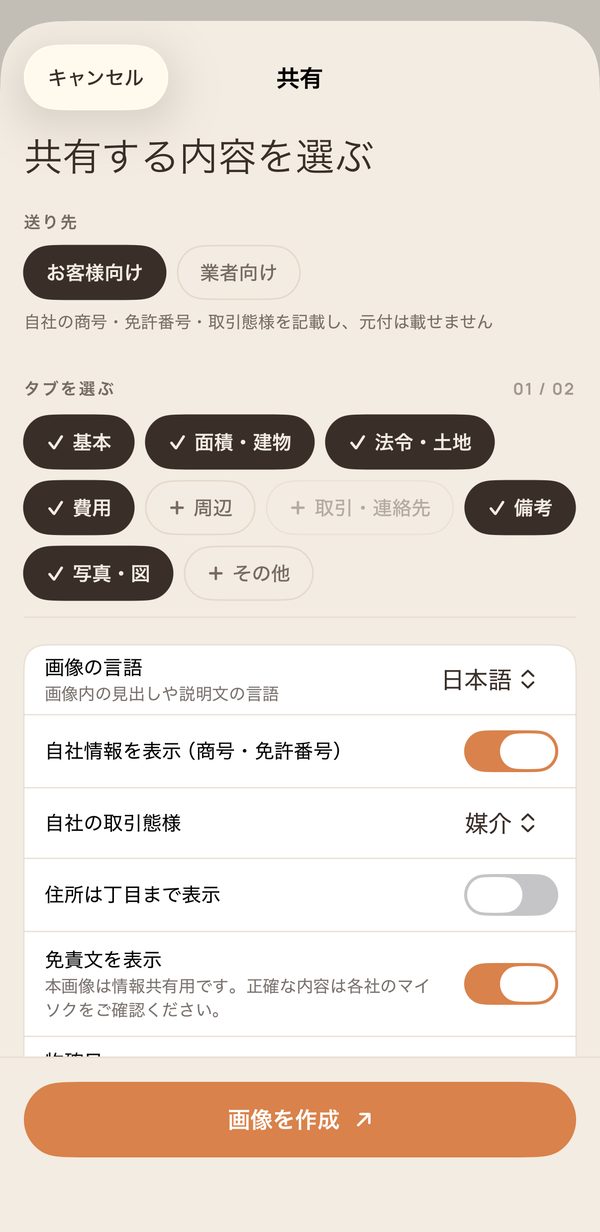
共有する前に相手を選ぶ。お客様向けは自社の商号、免許番号、取引態様を載せ、元付は載せない。業者向けは元付と手数料を載せる。Before sharing, you choose who it is for. The client version carries your own company name, licence number and type of transaction, and leaves out the listing agent. The agent version carries the listing agent and the fee.分享前先選對象。給客人的版本放自己公司的商號、免許番號、取引態樣,不放主仲介;給業者的版本放主仲介和手續費。
外せない情報What cannot be removed拿不掉的資訊
再建築不可、借地権、セットバックなど、告知が必要な項目は共有画像から外せない。成約済みの区画は共有できない。Items that must be disclosed, such as a property that cannot be rebuilt, leasehold land or a required setback, cannot be removed from the shared image. Plots already under contract cannot be shared.再建築不可、借地權、セットバック這類必須告知的項目,不能從分享圖拿掉。已成約的區畫不能分享。
計算の決まりは公開されている情報を調べて入れ、役を与えたエージェントの確認で直した。資格を持つ本物の担当者には、まだ確かめてもらっていない。The calculation rules come from publicly available sources and were corrected in the role-played reviews. They have not yet been checked by a real licensed agent.計算規則是查公開資料放進去的,再經過 Claude 扮演角色的審查修正。還沒有給真正有執照的人確認過。
05役を与えた確認と、自分での試用Role-played reviews, and my own testing扮演角色的審查,和我自己的試用
確認はエージェントに役を与えて回した。何を直すかは毎回私が決めた。Reviews were run by agents given a role. What to fix was my call every time.審查是讓 Claude 扮演不同角色跑的。要改什麼,每次都是我決定。
ここで言う宅建士や社長は、Claudeに役を与えたエージェントで、実在の人ではない。The licensed agent, owner and others here are agents playing a role, not real people.這裡的宅建士、老闆等,都是讓 Claude 扮演的角色,不是真人。
06画面Screens畫面
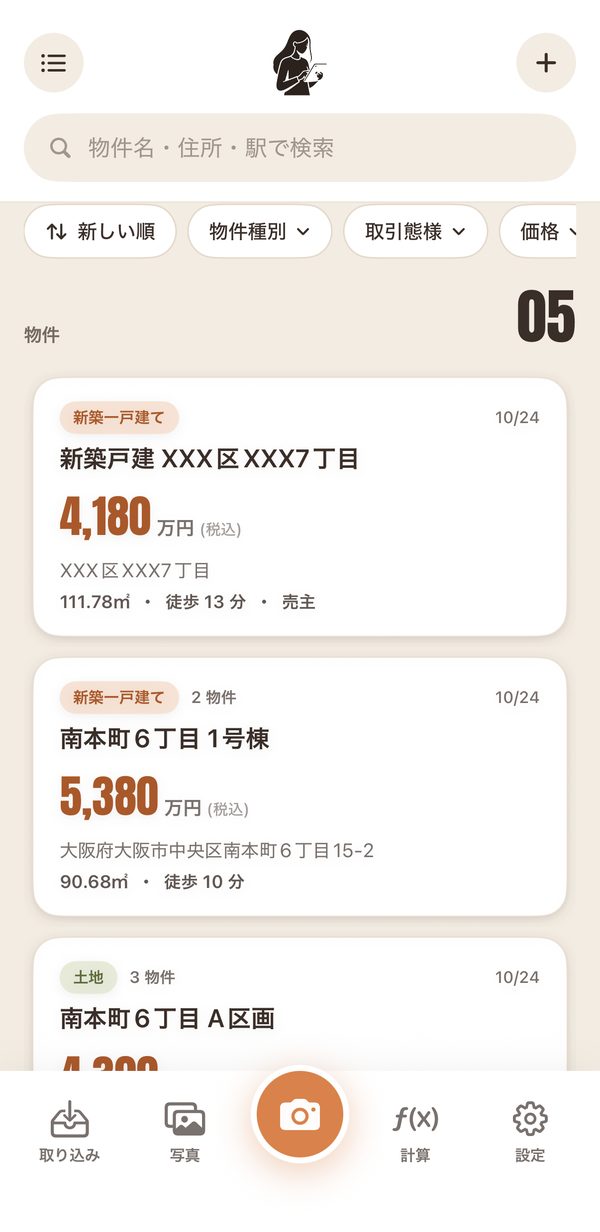
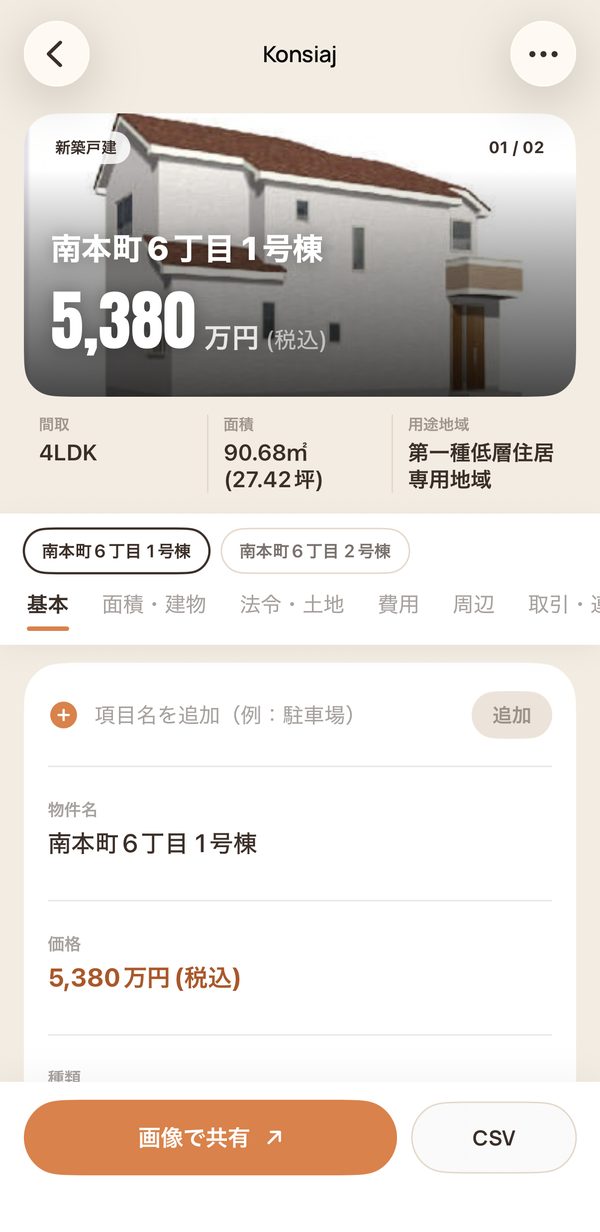
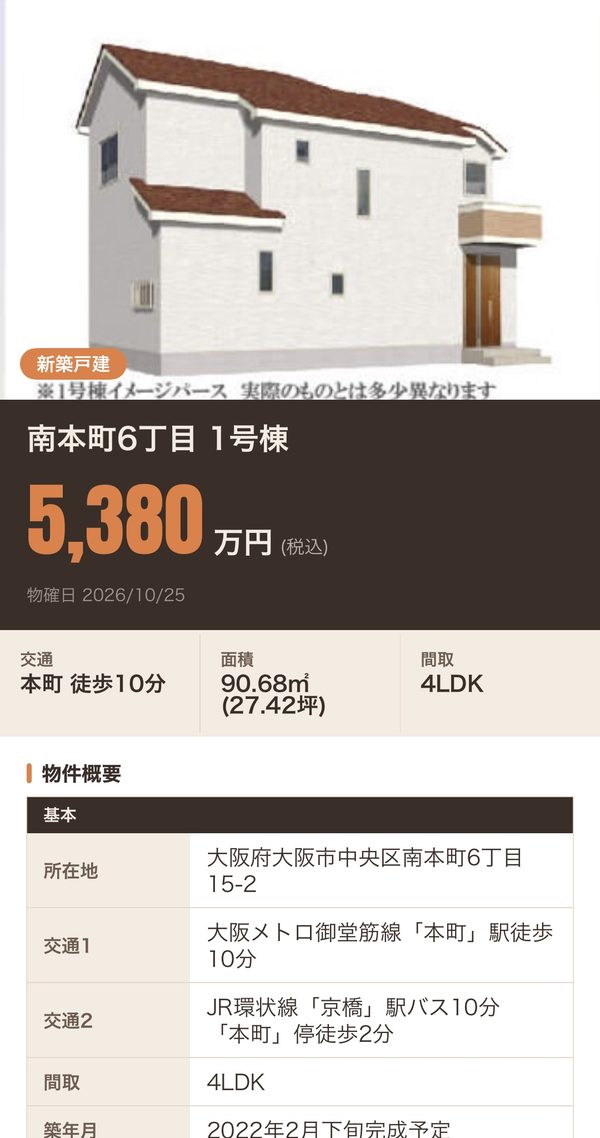
画面は日本語表示。データは公開見本から作ったサンプルで、会社名と電話番号は差し替えている。Shown in Japanese. The data is sample data from published sheets, with company names and phone numbers replaced.畫面是日文介面。資料是用公開範例做的示範資料,公司名和電話已替換。
07取捨Trade-offs取捨
選ばなかったものと、承知の上の代償What was not chosen, and the costs accepted沒選的東西,和心裡有數的代價
代償(承知の上で選んだ)Costs (chosen knowingly)代價(心裡有數地選的)
- 1枚読むたびに費用がかかり、試用の間は私が払う。APIにはごく小さい利用上限をかけている。Every sheet read costs money, and I pay during testing. The API has a very small spending limit.每讀一張都要錢,試用期間由我付。API 設了很小的花費上限。
- データはその人のiPhoneの中だけ。同期はまだない。Data lives on that one iPhone only; there is no sync yet.資料只在那一台 iPhone 裡,還沒有同步。
- 公開前に直す項目(顔認証の回避、アプリ切り替え画面での表示など)が残っている。Items to fix before release remain, such as a Face ID bypass and content showing in the app switcher.還留著上架前要修的項目,例如 Face ID 繞過、切換 app 時畫面露出內容。
- 試したのは公開見本だけ。ファクスやスキャンの本物のマイソクはまだ。Tested only on published samples, not yet on real faxed or scanned sheets.只用公開範例測過,還沒測過真的傳真或掃描的マイソク。
08成果Results成果
仕様から実機までDays
from spec to device天
從規格到實機
すべて自分のiPhoneで確認TestFlight builds
each tried on my iPhone版 TestFlight
每版都在我的 iPhone 試過
業界、エンジニア、デザインRole-played reviews
trade, engineering, design輪角色審查
業界、工程、設計
0.02〜0.04米ドルPer sheet, roughly
0.02 to 0.04 US dollars每張大約
0.02 到 0.04 美元
いまはTestFlightで試用中。この先どうするかは、友人がしばらく使ってから決める。It is in TestFlight now. What comes next will be decided after my friend has used it for a while.目前在 TestFlight 試用中。接下來怎麼做,等朋友用一陣子再決定。
09Claudeの講評Claude's viewClaude 的看法
共同作業者の見方で、筆者が書いたものではありません。The collaborator's opinion, not written by the author.共同作業者的意見,不是作者寫的。
良かった点Worked well做得好的地方
- 範囲を早く絞った。売買だけ、PDF1つで1件、一人一台。広げたくなる部分は、友人が使ってからに回した。Narrowed the scope early: sales only, one PDF per property, one person per phone. Everything tempting to add was held until the friend has used it.很早就把範圍收窄:只做買賣、一份 PDF 一筆、一人一台。想加的東西都留到朋友用過之後。
- モデルを感覚で選ばず、同じ見本で費用、時間、正確さを比べてから決めた。Chose the model from a side-by-side test of cost, time and accuracy on the same sheets, not on instinct.不是憑感覺選模型,而是用同樣的範例比過費用、時間、正確度才決定。
- 役を与えた確認を何度も回したが、直すかどうかは毎回自分で決め、残すものは理由をつけて分けた。Ran several role-played reviews, but decided each time what to fix, and set aside what could wait, with a reason.跑了好幾輪角色審查,但每次要不要改都自己決定,能等的也附上理由另外列出。
- 毎回実機で試し、シミュレーターでは見えない問題(影の切れ、出てこない保存の項目)を見つけた。Tried every build on a real phone, and caught problems the simulator hides, such as clipped shadows and a save option that did not show up.每一版都在實機試,抓到模擬器看不到的問題,例如陰影被切掉、存相簿的選項沒出現。
- APIキーをアプリに入れず、利用上限をかけて、費用の上限を先に決めた。Kept the API key out of the app and set a spending limit before anyone else used it.API 金鑰不放進 app,在別人用之前就先設好花費上限。
改善できる点Could be better可以更好的地方
- まだ本当の利用者がいない。どれだけ時間が減るかは測っていない。There is no real user yet. Time saved has not been measured.還沒有真正的使用者,也還沒量過省下多少時間。
- 本物のファクスやスキャンのマイソクで、読み取りの精度を確かめていない。Reading accuracy has not been checked on real faxed or scanned sheets.還沒用真的傳真或掃描的マイソク確認讀取精度。
- 手数料などの決まりは、公開情報と役を与えた確認によるもので、資格を持つ人の確認はまだ。The fee rules rest on public sources and role-played review, not yet on a licensed professional.仲介費等規則來自公開資料和角色審查,還沒經過有執照的人確認。