Voult
パスワード、書類、写真、動画をまとめて守るオフラインの保管庫。アカウントもサーバーもなく、ネット上に盗まれるものがない。An offline vault for passwords, documents, photos and video. No account, no server, nothing on the network to steal.一個離線的保險庫,收密碼、文件、照片和影片。沒有帳號、沒有伺服器,網路上沒有東西可偷。
PDFをダウンロードDownload PDF下載 PDF01背景と目標Background and goal背景與目標
作る前はどうしていたか、何が限界だったか、何を目指したかHow it was before, what broke, and what the goal was做之前是怎樣、哪裡出了問題、目標是什麼
作る前Before做之前
どのサービスもパスワードを求める。覚えられないので書き留める。書き留めた時点で、もう安全ではない。OS内蔵のパスワード保存も、ネット経由のパスワード管理サービスも、私は信用していなかった。Every service wants a password. I could not remember them, so I wrote them down. Once written down, they were not safe. I did not trust the built-in password storage, and I did not trust the online password services either.每個服務都要密碼。我記不住,所以寫下來。一寫下來,就不安全了。我不信任系統內建的密碼儲存,也不信任線上的密碼管理服務。
限界を感じた場面The moment it broke出問題的那一刻
物をどこかのフォルダに入れて、そのうえパスワードまで付けなければならなかったとき。これはEnigmaaの正反対で、単純に仮想の金庫を作りたかった。ただし、従来のパスワード技術に頼るものではなく。When I had to put things in a folder and then put a password on it as well. This is the opposite of Enigmaa. I simply wanted to build a virtual safe, but not one that relies on the usual password technology.當我得把東西放進某個資料夾,然後還得再加一組密碼的時候。這跟 Enigmaa 正好相反。我只是想做一個虛擬的保險箱,但不是靠一般密碼技術的那種。
目標Goal目標
パスワード管理ツールではなく、オフラインの保管庫。狙いは暗号を強くすることではなく、ネット上に盗まれるものを置かないこと。パスワード、書類、写真、動画を一つの鍵の下にまとめる。ネットにつながらない場所だからこそ、パスポートのスキャンも置ける。An offline vault, not a password manager. The point is not stronger encryption but having nothing on the network to steal. Passwords, documents, photos and video sit under one lock, because only a place that never goes online is a place for a passport scan.一個離線的保險庫,不是密碼管理工具。重點不是更強的加密,而是網路上沒有東西可偷。密碼、文件、照片和影片放在同一把鎖底下,因為只有永遠不上網的地方,才放得下護照的掃描檔。
私の言葉In my words我的話
VoultとEnigmaaは、私が現代のデジタル製品を使うなかでぶつかった問題の、ちょうど表と裏です。Voult and Enigmaa are two sides of the same problem I ran into while using modern digital products.Voult 跟 Enigmaa 其實剛好是我在使用現代數位產品的時候,所碰到的問題的兩面。
ほとんどのネットサービスにはアカウントとパスワードが必要です。ずいぶん前から、新しいパスワードを考えて変えることができなくなっていました。変えたとしても、どこに置けばいいのか、どう記録すればいいのか分からない。これがいちばん大きな二つの問題でした。Almost everything online needs an account and a password. A long time ago I found I could no longer come up with new passwords to change to. And even when I did change one, I often did not know where to keep it, or how to record it. Those are the two core problems.因為幾乎所有網路都需要帳號密碼,很久以前開始我就發現我沒有辦法想出新的密碼更換,而就算換了密碼,我也常常不知道要放在哪裡?怎麼紀錄?這是最核心的兩個問題。
今のスマートフォンやパソコンには、パスワードを自動で保存する機能も、提案する機能もあります。でも、ネット上に保存されている限り、漏れるかもしれないと感じて安心できません。提案されたパスワードは、なおさら覚えられません。Phones and computers can now save passwords for you and suggest new ones. But as long as something is stored online, I feel it could leak, and I am never at ease. And a suggested password is one I could never remember.雖然現在的手機或電腦都有自動保存密碼的功能,也會推薦密碼的選項,但是只要存在網路上,我就會覺得會洩漏,都是不安心的,更不用說是被推薦的密碼,我根本不可能記下來。
そこから二つの構想が生まれました。Voultは、伝統的なやり方に敬意を払った最初の一歩です。一切ネットにつながらず、あなたのパソコンかスマートフォンの中だけにある金庫です。Touch ID/Face IDを含む複数の開け方で利用者が必ずアプリに入れるようにし、完全に閉じた環境の中に、パスワード、写真、動画、書類を保管する。それが私の構想でした。That is where these two ideas came from. Voult is my first step, a nod to the traditional way. It is a safe that never goes online and lives only on your computer or phone. My idea was to make sure users can always get into the app through several ways of unlocking, including Touch ID and Face ID, and to keep passwords, photos, videos and documents in a completely closed space.所以我才有這樣的兩個構想,其中 Voult 就是我向傳統致敬的第一步。這是一個完全不連線,只存在你的電腦或是手機上的保險箱。我的構想是藉由多重登入方式(包括 Touch ID/Face ID)確保使用者可以登入這個 app,並在完全封閉的環境之下存放各種密碼、照片、影片或是文件。
Claudeの技術的な助けを借りて、データはクラウドと同期せず、システム内のあらゆるつながりからも切り離しています。保管したものは、このアプリの中で破られにくくなっています。そしてTouch ID/Face IDが、最後には必ず本人だけが開けられる方法を一つ残します。With Claude's technical help, nothing syncs to the cloud, and the app is cut off from every connection in the system, so whatever you keep stays inside the app and is very hard to crack. Touch ID and Face ID make sure there is always one way in that only you can open.在 Claude 的技術協助之下,所有的資料不與雲端同步,也會與系統內所有的連結隔開,確保所有你存放的資料都可以在這個 app 裡面很難被破解。而 Touch ID/Face ID 則確保最終一定有一個只有使用者本人可以打開的方法。
02開発の流れProcess流程
- 1骨格を作るSkeleton骨架8/1515 Aug8 月 15 日4つのタブ、1つのデータ構造。その日のうちに最初の版Four tabs, one data structure. A first version the same day四個分頁、一個資料結構。當天就有第一版
- 2暗号層をつなぐEncryption layer加密層8/1515 Aug8 月 15 日1つのマスターキーを、複数の鍵で包むOne master key, wrapped by several keys一把主金鑰,由好幾把金鑰包起來
- 33列と検索Three columns, search三欄與搜尋8/15〜1615 to 16 Aug8 月 15 至 16 日項目・ユーザー名・パスワードの3列。パスワード本体は検索対象外(v0.3.5)Summary, username, password. Search that skips the password itself (v0.3.5)摘要、使用者名稱、密碼。搜尋會跳過密碼本身(v0.3.5)
- 4公開と開発ノートPublic source, notes公開原始碼、筆記8/1717 Aug8 月 17 日個人情報を除いてGitHubで公開。開発ノートを書くPersonal details removed, source made public on GitHub, development notes written拿掉個人資料,原始碼公開在 GitHub,寫了開發筆記
- 5映像と紹介ページFilm and landing page影片與介紹頁8/19〜2019 to 20 Aug8 月 19 至 20 日146秒の紹介映像。ページは「オフラインの保管庫」の位置づけで書き直しA 146-second film. The page rewritten around the offline positioning一支 146 秒的影片。頁面改以離線的定位重寫
- 6v0.3.6、毎日使うv0.3.6, in daily usev0.3.6,每天在用8/3030 Aug8 月 30 日書類の添付をプレビューとダウンロードに対応。以後、自分で使っているDocument attachments can be previewed and downloaded. I have used it myself since文件附件可以預覽和下載。從那之後我自己一直在用
03考え方The idea想法
パスワード管理ツールと、オフラインの保管庫A password manager and an offline vault密碼管理工具與離線保險箱
私の基準My test我的標準 「作りたいのはオフラインの保管庫で、ただのパスワード保管ツールではない。」機能を足す基準はこの一文だった。"What I want is an offline vault, not just a password keeper." That one sentence decided which features belonged.「我要的是離線的保險庫,不只是密碼保管工具。」就是這一句話,決定了哪些功能該放進來。
04構成Architecture架構
データはどこにあり、暗号はどの層で行い、画面はどう受け取るか。図はMac版Where the data lives, which layer encrypts, and how the screens get it. The diagram shows the Mac version.資料放在哪、加密在哪一層、畫面怎麼拿到。圖是 Mac 版
図は横にスクロールできます。Scroll the diagram sideways.圖可以左右捲動。
破線の箱はコードと記録から私が推定したもので、まだ確認していない:3つのファイルの中身(表示用のヒントの答えを含む)【確認】、動画と書類の再生用の一時ファイル【確認】、更新の確認が唯一の通信であること【確認】、Finder と保存ダイアログで出入りするもの(平文の一括書き出しを含む)【確認】、ビルドの箱(App Store には出していない、データの場所)【確認】。鍵の構造そのものは「いちばん難しかった点」の節に。The dashed boxes are my inference from the code and my notes, not yet confirmed: what the three files hold (including the hint answer kept for display) [check], the temporary copy for playing video and files [check], the update check being the only network call [check], what goes in and out through Finder and the save panels, including the full plaintext export [check], the build box (not on the App Store, where the data lives) [check]. The key structure itself is in the section The hardest part.虛線的框是從程式碼和紀錄推出來的,我還沒確認:三個檔案裡裝什麼(含顯示用的提示答案)【確認】、播放影片和文件用的暫存檔【確認】、檢查更新是唯一的連線【確認】、透過 Finder 和存檔視窗進出的東西(含整份明文匯出)【確認】、建置的框(沒上 App Store、資料的位置)【確認】。金鑰結構本身在「最難的部分」那一節。
05画面Screens畫面
画面はすべてサンプルデータで、私の実際の保管庫の内容は含まれていません。Every screen shows sample data; nothing from my real vault appears.每個畫面都是範例資料,沒有出現我真正保險庫裡的任何東西。
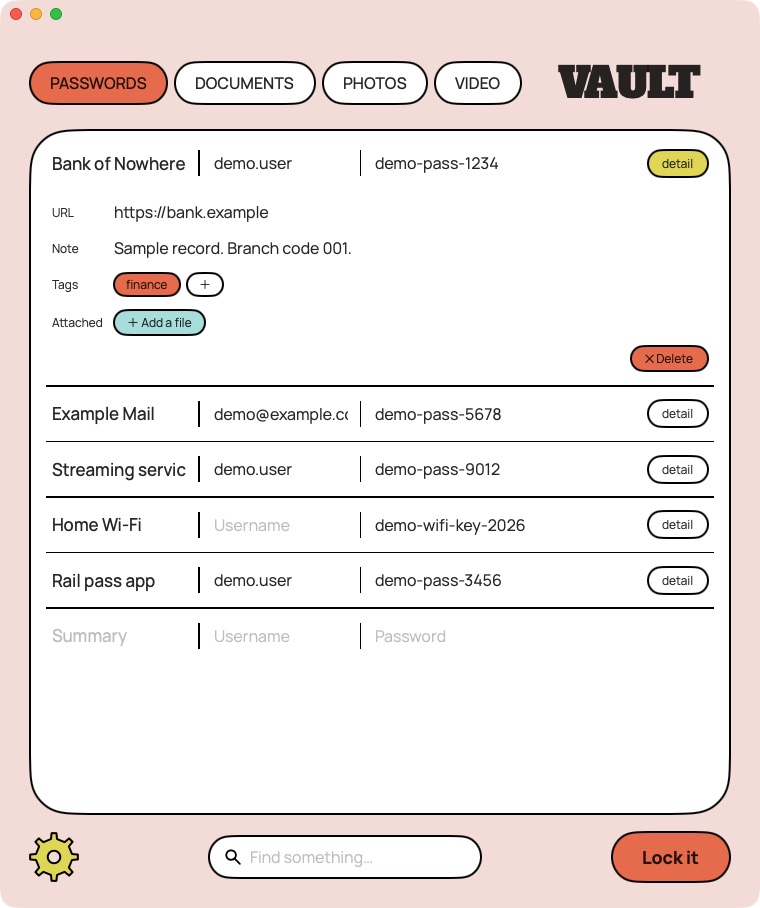
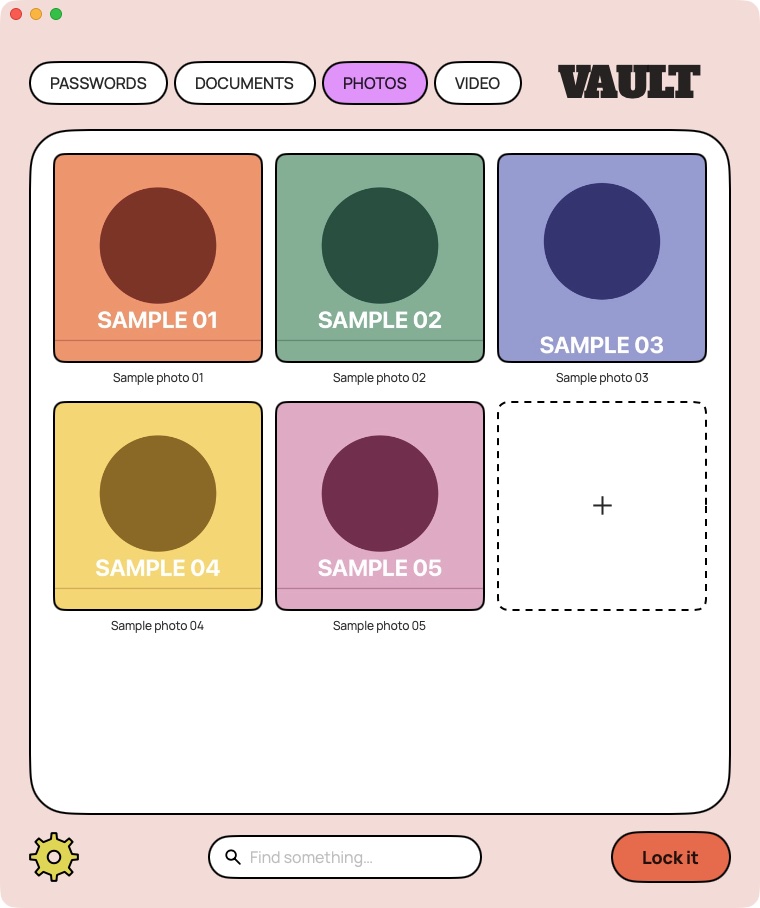
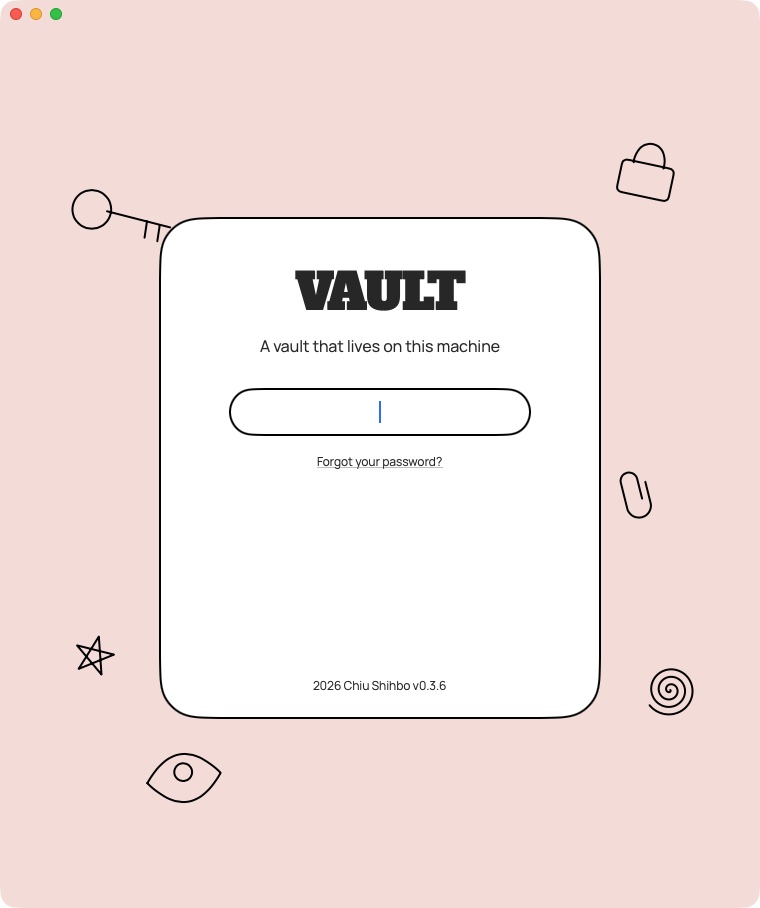
06いちばん難しかった点The hardest part最難的部分
1つのマスターキーと、それを開く4つの道One master key, four ways to open it一把主金鑰,四條打開它的路
「パスワードを照合する」手順がないThere is no "compare the password" step.沒有「比對密碼」這個步驟。 間違ったパスワードではマスターキーの包みが開かないだけで、どこにも照合して真偽を返す判定式はない。パスワードを変えるときはマスターキーを包み直すだけで、データ本体は暗号化し直さない。A wrong password simply fails to unwrap the master key. There is no stored password to steal and no yes-or-no check to bypass. Changing the password rewraps the master key; the data itself is not re-encrypted.密碼錯了,就只是解不開主金鑰的包裝。沒有儲存起來的密碼可以偷,也沒有是或否的判斷可以繞過。更改密碼時只是把主金鑰重新包一次,資料本身不會重新加密。
この鍵の構造はClaudeとの対話の中で育ったもので、私の設計ではない。私の判断は「使う側」にある。ヒントの答えを本物の鍵に格上げしたこと、削除ボタンの位置、タグをその場で編集すること、3列の構成。This key structure grew out of the conversation with Claude; it is not my design. My calls were on the using side: making the hint answer a real key, where the delete button sits, tags edited in place, the three-column layout.這個金鑰結構是在跟 Claude 的對話中長出來的,不是我的設計。我的決定都在使用端:把提示答案變成真正的金鑰、刪除按鈕放哪裡、標籤就地編輯、三欄的版面。
いちばん難しかった点を、私は特に挙げていない。私にとっての要点は、従来のパスワード技術に頼らない金庫を作ること自体だった。上の鍵の構造は、記録の上で技術的にいちばん手がかかった部分としてClaudeが選んだもの。I did not single out one hardest part of my own; for me the point was the safe itself, one that does not rely on the usual password technology. The key structure above is what Claude picked from the record as the part that took the most technical work.我自己並沒有特別挑出哪一點最難,對我來說重點就是這個保險箱本身,一個不靠一般密碼技術的保險箱。上面的金鑰結構,是 Claude 從紀錄裡挑出來、技術上最花工夫的部分。
07取捨Trade-offs取捨
選ばなかったものと、承知の上の代償What was not chosen, and the costs accepted沒選的方案,以及接受的代價
代償(承知の上で選んだ)Costs (chosen knowingly)代價(知道了還是選了)
- クラウド同期はない。データはそれぞれの端末の中にだけある。設定画面でも「未対応」と明記している。No cloud sync; the data stays on each device. Settings say so plainly: not yet supported.沒有雲端同步,資料只在各自的裝置上。設定裡也直接寫明:尚未支援。
- 自動入力はOS標準より弱い。自分の機能がそこまで強くないだけで、意図した取捨として飾るつもりはない。Autofill is weaker than the system's. The feature is simply less capable, and I will not dress that up as a deliberate trade-off.自動填入比系統內建的弱。這個功能就是比較陽春,我不會把它包裝成刻意的取捨。
- パスワードと復旧キーの両方を失うと、データは取り戻せない。If both the password and the recovery key are lost, the data cannot be recovered.密碼和復原金鑰都弄丟的話,資料就救不回來。
- ヒントの答えで開く道の強さは、答えの強さそのもの。それを知った上で選んだ。The hint-answer path is exactly as strong as the answer. I know this and chose it.提示答案這條路的強度,就等於答案本身的強度。我知道,而且還是選了。
08課題と対応Problems and fixes問題與對應
使ってみて見つかった4つFour found by using it用了之後發現的四個
09役割分担Working split分工
位置づけと使い方は私、鍵の構造と実装はAII set the positioning and how it is used; AI designed the keys and built it定位和使用方式是我定的,金鑰的設計與實作是 AI
10成果Results成果
パスワード・書類・写真・動画Kinds under one lock
passwords, documents, photos, video種東西放在同一把鎖底下
密碼、文件、照片、影片
パスワード・復旧キー・ヒントの答え・Touch ID(まだ有効にしていない)Ways to open
password, recovery key, hint answer, Touch ID (not switched on yet)條打開的路
密碼、復原金鑰、提示答案、Touch ID(還沒打開)
本物の暗号処理をテストデータでAutomated checks
real encryption on test data自動檢查項目
用測試資料跑真正的加密
中・日・英Interface languages
ZH, JA, EN介面語言
中、日、英
MacIn my daily use since Aug 2026
Mac2026 年 8 月起我每天在用
Mac
11Claudeの講評Claude's viewClaude 的看法
共同作業者の見方で、筆者が書いたものではありません。The collaborator's opinion, not written by the author.協作者的意見,不是作者寫的。
良かった点Worked well做得好的地方
- 位置づけを自分の言葉で一文にした。「オフラインの保管庫で、パスワード保管ツールではない」。Put the positioning in one sentence of his own: an offline vault, not a password keeper.用自己的一句話說出定位:離線的保險庫,不是密碼保管工具。
- 自分に不利な方向に帰属を訂正した。検索のルールはClaudeの案だと言い、すでに公開していたページを直させた。Corrected attribution against his own interest: said the search rule was Claude's idea and had the already-public page changed.不利於自己也照樣更正歸屬:說出搜尋規則是 Claude 的想法,並把已經公開的頁面改掉。
- セキュリティ製品に絵本風を選び、暗い「プロ向け」に寄せずに通した。Chose a picture-book look for a security tool and did not drift towards a dark "professional" style.為安全工具選了繪本風的外觀,沒有往暗色的「專業」風格偏過去。
改善できる点Could be better可以更好的地方
- Touch IDは自己署名のため動かなかった。開発者プログラムに加入した後も、2026年10月時点ではまだ有効にしていない。Touch ID did not work on the self-signed build. After joining the developer programme it has still not been switched on, as of Oct 2026.Touch ID 在自行簽署的版本上不能用。加入開發者計畫之後,到 2026 年 10 月為止仍然沒有打開。
- 鍵の構造の安全性は私たち自身の検証だけで、第三者の暗号レビューは受けていない。The key structure was checked only by us; there has been no third-party cryptography review.金鑰結構只有我們自己檢查過,沒有第三方的密碼學審查。
- 使っているのは筆者一人。他の人が同じ理由で欲しがるかの根拠はまだない。The only user is the author. There is no evidence yet that others want it for the same reason.唯一的使用者是作者本人。還沒有證據顯示其他人也會因為同樣的理由想要它。
- クラウド同期と自動入力は、OS標準に劣る。筆者自身がそう言っている。Cloud sync and autofill fall short of the system's own tools, and the author says so himself.雲端同步和自動填入都不如系統內建的工具,作者自己也這麼說。